 Takshak Hub
1. Executive Summary & Market Landscape
In modern precision machining, CNC programmers and shop owners are facing a severe dilemma: escalating subscription paywalls, forced cloud dependencies, and loss of intellectual property privacy.
While Autodesk Fusion 360 has established a presence in the Cloud CAD/CAM SaaS ($680/yr base + $1,600/yr Machining Extension) market, machinists across YouTube, Instagram, and Reddit/Facebook machining communities increasingly voice frustration over its licensing restrictions, workflow friction, and high total cost of ownership.
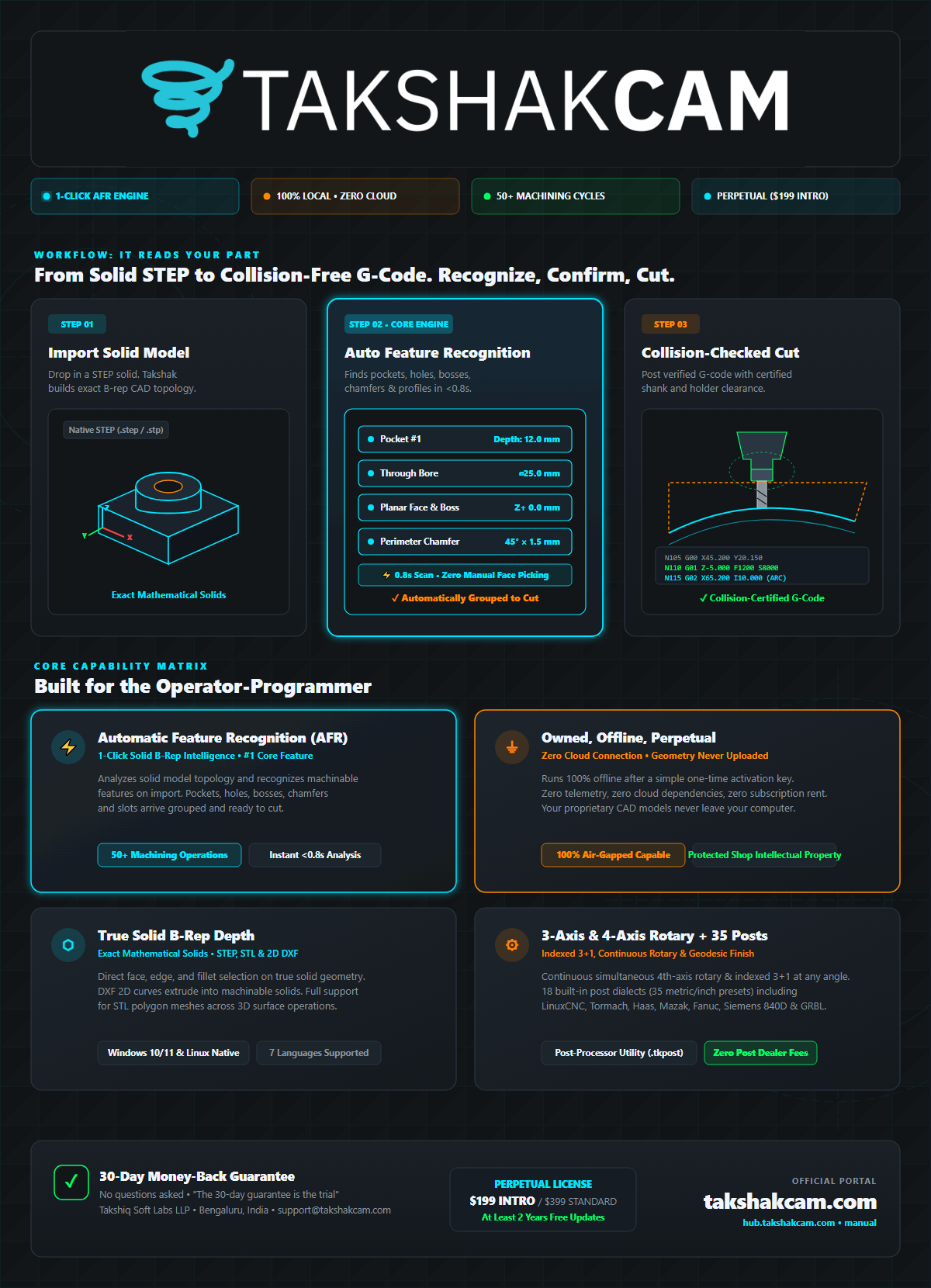
Takshak CAM was engineered from the ground up as the antidote: a high-performance, perpetual desktop CAM application that is 100% Offline after a one-time activation (Zero runtime cloud check-ins, zero telemetry), featuring 50+ machining operations, Automatic Feature Recognition (AFR) on native STEP solid B-rep models, true simultaneous 4-axis rotary toolpaths with Certify Toolpath collision verification, native Linux and Windows binaries, and 35 post-processors across 18 dialects (metric and inch) with a built-in Post-Processor Utility for industrial CNC machines.
2. Top Influencer Gripes & Community Pain Points with Autodesk Fusion 360
Based on an exhaustive audit of discussions across top CNC creators (including Cutting Edge Engineering, Inheritance Machining, NYC CNC, Titans of CNC, Practical Machinist, EdgePrecision, and major CNC Facebook groups), here are the primary grievances reported by users of Autodesk Fusion 360:
⚠️ Gripe #1: Forced Cloud Storage & Online Check-ins
If disconnected for more than 14-30 days or during cloud server outages, machinists are locked out of generating toolpaths on the shop floor.
⚠️ Gripe #2: Extension Paywalls (Enshittification)
Basic multi-axis rotary, rapid feed moves, automatic toolpath trimming, and hole recognition were stripped or shifted behind the expensive $1,600/yr 'Machining Extension'.
⚠️ Gripe #3: Forced Automatic Updates Breaking Posts
In the middle of production shifts, silent cloud background updates have broken custom post-processors and tool libraries.
⚠️ Gripe #4: Defense / IP / ITAR Compliance Risks
Uploading confidential CAD geometry and military/aerospace STEP files to AWS cloud servers violates client NDAs and defense regulations.
⚠️ Gripe #5: Resource-Heavy Desktop Client
WebGL / Chromium desktop wrapper suffers from sluggish UI lag and memory leaks on complex multi-operation parts.
3. Comprehensive Feature-by-Feature Comparison: Autodesk Fusion 360 vs. Takshak CAM
The following table compares Autodesk Fusion 360 against Takshak CAM across key operational, architectural, and financial dimensions:
| Comparison Vector | Takshak CAM (Perpetual Desktop CAM) | Autodesk Fusion 360 (Autodesk) |
|---|---|---|
| Licensing Model | Perpetual License ($199 intro / $399 perpetual) | Annual Subscription ($680/yr + $1,600/yr Extension) |
| Offline Architecture | 100% Offline after a one-time activation (Zero runtime cloud check-ins, zero telemetry) | Requires online login every 14-30 days; server outages halt work |
| Operating System | Native Linux (Ubuntu, Debian, Mint) & Windows 10/11 | Windows & macOS only (No Linux support) |
| Automatic Feature Recognition | Built-in native AFR on STEP B-rep solids (Holes, Pockets, Bosses, Faces) | Locked behind $1,600/yr Machining Extension or manual selection |
| Simultaneous 4-Axis Rotary | Built-in continuous geodesic finishing & collision certification | Requires paid Machining Extension ($1,600/yr) |
| Post-Processors | 35 Built-in posts (18 dialects, metric & inch) + Post-Processor Utility | Cloud post library with frequent breaking schema changes |
| Data Privacy & ITAR | 100% Air-Gapped / Zero Telemetry / Files stay on local disk | All files stored on Autodesk AWS cloud servers |
| Tool & Material Feeds | Built-in Material Library with auto feed seeding per alloy | Cloud tool library with manual feed overrides per operation |
| 5-Year Total Cost (TCO) | $199 - $399 (Flat, one-time) | $3,400 - $11,400+ (Recurring subscription lock-in) |
4. Deep-Dive: Why Machinists Are Choosing Takshak CAM
1. Zero-Friction Automatic Feature Recognition (AFR)
Unlike traditional CAM workflows that require clicking dozens of individual faces, edges, and pockets, Takshak CAM analyzes the analytical B-rep solid model geometry on STEP import. It automatically groups:
- Holes, Counterbores & Notches: Canned drilling cycles (G81, G82, G83 peck, G73 chip-break, G85 bore) and boring.
- Pockets & Pits: Pocket clearing, Ramp Pocket, and Wall Finishing for drafted or straight cavities.
- Plugs & Profiles: Boss clearing (Plug Clear), Wall Finish, and 2D Profiles (Contour and native G2/G3 Arc Contour).
- Fillets, Chamfers, Cone Cavities & Sloped Floors: Dedicated Form and Mill cycles for edge breaks, countersinks, and sloped regions.
2. True Continuous 4-Axis Rotary Machining with Collision Certification
Where other CAM packages charge thousands for multi-axis add-ons or limit rotary to simple 2D unwrapped indexing, Takshak CAM includes:
- Simultaneous 4-Axis Rotary Toolpaths: Geodesic Finish, continuous 4-axis roughing (Adaptive and Level Rough with rest machining mode), rotary parallel, rotary pencil, and rotary contour.
- Feature-Driven Rotary Operations: Wrapped contours/pockets, eccentric turning/clearing, rotary holes, OD steps, grooves, and face finishing.
Certify ToolpathVerification: Gouge and collision verification against tool, holder, and stock before G-code reaches your machine controller.
3. Complete Offline Privacy & Air-Gapped Security
- 100% Offline after a one-time activation (Zero runtime cloud check-ins, zero telemetry).
- Your proprietary CAD models and toolpaths never leave your local computer.
- Completely immune to cloud service outages, broadband dropouts, and forced remote license revocation.
- Fully compliant for aerospace, defense (ITAR compliant), medical, and confidential prototype manufacturing.
4. Native Linux & Windows Cross-Platform Freedom
- First-class Linux desktop support (Ubuntu, Debian, Linux Mint) designed specifically for LinuxCNC machine controllers and lean shop PCs.
- 100% compatible with Windows 10 & 11.
3 Axis Adaptive Clear, 3D Pocket, Z Level and Helical Ramp
High-efficiency adaptive roughing, continuous engagement clearing, and smooth 3D finishing.
5. Transparent Technical Limitations & Disadvantages of Takshak CAM
To provide an objective and honest evaluation, here are the key technical boundaries and functional areas where the competitor maintains an advantage:
⚠️ Limitation: No Integrated Parametric 3D CAD Modeler
Takshak is a dedicated CAM system and requires parts to be designed and exported as STEP/STL from external CAD (SolidWorks, Inventor, Fusion, FreeCAD), whereas Fusion 360 has built-in parametric sketch, assembly, sheet metal, and rendering environments.
⚠️ Limitation: No Continuous 5-Axis Machining
Takshak supports 3-axis, indexed 3+1 (fixed A angle), and continuous simultaneous 4-axis rotary, but does NOT support continuous 5-axis simultaneous milling (swarfing/blade milling).
⚠️ Limitation: No Turning / Mill-Turn / Lathe Module
Takshak is currently focused on 3-axis milling and 4-axis rotary milling; it lacks dedicated 2-axis lathe turning, live tooling mill-turn, and threading on lathes.
⚠️ Limitation: No Generative Design, FEA Simulation or Cloud Collaboration
Fusion 360 includes cloud finite element analysis (FEA), generative topology optimization, and real-time multi-user team cloud sharing which are not part of Takshak's local-only architecture.
6. 5-Year Total Cost of Ownership (TCO) Analysis
| Cost Category | Takshak CAM | Autodesk Fusion 360 |
|---|---|---|
| Year 1 Cost | $199 (Introductory) / $399 | High Initial License / Subscription |
| Year 2 Cost | $0 (At least 2 years of updates included) | Recurring Annual Fee |
| Year 3 & Beyond | $0 (Perpetual license — yours to keep forever) | Recurring Annual Fee |
| Commercial Guarantee | 30-day money-back guarantee (no trial / nothing expires) | No refund / Strict SaaS lock-in |
| 5-Year Total Investment | $199 - $399 Flat | Multi-Thousand Dollar Lock-in |
7. Migration Playbook: Moving from Autodesk Fusion 360 to Takshak CAM
- Phase 1 Orient: Pose and align your part in the 3D viewport using interactive gizmo controls or numeric fields; load clean standard STEP solid B-rep (AP203/AP214/AP242), STL mesh, or 2D DXF drawings and confirm part orientation.
- Phase 2 Setup: Define your machining setup (3-axis vertical mill or continuous 3+4 rotary setup with A-axis along X or Y), establish WCS origin (bounding-box corner/center snap or surface pick), and set stock block or cylinder margins.
- Phase 3 Machining with AFR/User Ops: Execute Automatic Feature Recognition (RUN AFR) on STEP solid B-rep geometry to detect holes, pockets, plugs, cones, chamfers, and fillets with optimal machining cycles, or add User Defined Operations from the 50+ ops library (3D adaptive roughing, continuous 4-axis geodesic finishing, parallel, and pencil).
- Phase 4 Tool Selection & Post Export: Pick cutters from the Tool Library, configure feeds and speeds with automatic material alloy seeding, compute toolpaths with Certify Toolpath rotary collision verification, and export production-ready G-code across 35 post-processors (18 dialects) or the built-in Post-Processor Utility.
From CAD to Real G-Code in Under 60 Seconds
Zero cloud lag: import solid STEP geometry and post verified G-code in under one minute.
8. Conclusion & Next Steps
If you are tired of subscription price hikes, forced cloud syncs, and complicated CAM interfaces, Takshak CAM gives you full professional power, permanent ownership, and a risk-free 30-day money-back guarantee (no trial / nothing expires).
- ? Explore the Live Site & Pricing: takshakcam.com
- ? Read the Complete User Manual: takshakcam.com/manual
- ?️ View Features & Operations: takshakcam.com/features